How to send order manually from WooCommerce to Nomad Wear
1. Login to your store admin.
2. Go to WooCommerce -> Orders
3. Select the order you want send to Nomad Wear
4. Then select the action Send to Nomad Wear from bulk action dropdown and click apply button
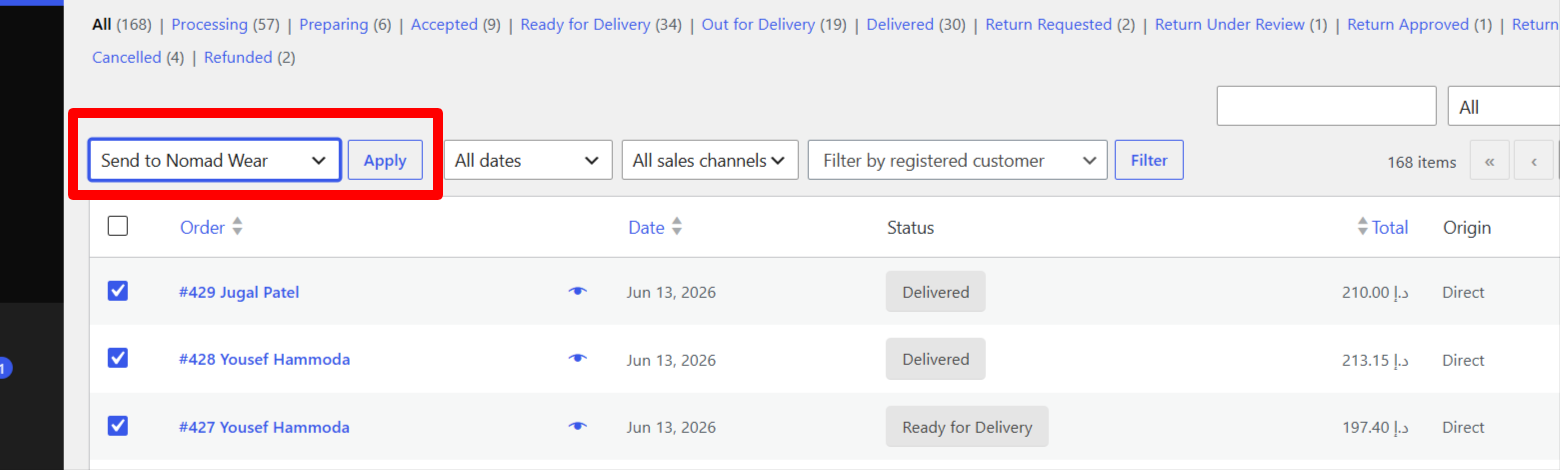
5. If order shipping address with in Nomad wear area zone then it will sync with Nomad wear.
Related Articles
How to send order manually from Magento to Nomad Wear
1. Login to you Magento 2 store admin. 2. Go to Sales -> Orders 3. Select the orders you want to send to Nomad Wear. 4. Then select the "Send to Nomad Wear" from action dropdown. 5. It will open the confirmation popup. Click on ok and it will sync ...How to send order manually from Shopify to Nomad Wear
1. Login to you Shopify store admin. 2. Go to Apps -> Nomad Wear -> Recent Orders 3. Select the orders you want to send to Nomad Wear and which Not Synced yet. 4. Then click on Send 2 Orders To Nomad button it will Synced the orders.How to connect WordPress/ WooCommerce with Nomad Wear
1. Login to your online WooCommerce store admin. 2. Download and Install Plugin if not install yet. https://wordpress.org/plugins/nomad-shipping/ 3. After activate the Nomad Wear plugin go to WooCommerce -> Settings -> Shipping -> Nomad Wear 4. ...How to connect Shopify with Nomad Wear
1. Login to your online Shopify store admin. 2. Download and Install Shopify Nomad Wear shipping App if not install yet. https://apps.shopify.com/nomad-wear 3. After installed the Nomad Wear App go to Apps -> Nomad Wear 4. Enable Nomad Wear. 5. Get ...How customer can login to nomad wear
1. Customer who placed the first order with nomad wear and setup their account can user our app for login. 2. Downloads and install our app for iPhone and Android if not installed yet 3. Fill up your Email or Phone and password. 4. Click on login.